Showing posts with label cabling. Show all posts

Tuesday, January 3, 2012

Disadvantages of Fiber-Optic Cabling


With all of its advantages, many people use fiber-optic cabling. However, fiber-optic cabling does have a couple of disadvantages, including higher cost and a potentially more difficult installation in some cases.

Cost

It's ironic, but the higher cost of fiber-optic cabling has little to do with the cable these days. Increases in available fiber-optic cable–manufacturing capacity have lowered cable prices to levels comparable to high-end UTP on a per-foot basis, and the cables are no harder to pull. Modern fiber-optic connector systems have greatly reduced the time and labor required to terminate fiber. At the same time, the cost of connectors and the time it takes to terminate UTP have increased because Category 5e and Category 6 require greater diligence and can be harder to work with than Category 5. This is even more of a concern for Category 6A and STP cabling. So the installed cost of the basic link, patch panel to wall outlet, is roughly the same for fiber and UTP.
Here's where the costs diverge. Ethernet hubs, switches, routers, NICs, and patch cords for UTP are relatively (no, not relatively, very) inexpensive. A good-quality UTP-based 10/100/1000 autosensing Ethernet NIC for a PC can be purchased for less than $25. A fiber-optic NIC for a PC costs at least four times as much. Similar price differences exist for hubs, routers, and switches. For an IT manager who has several hundred workstations to deploy and support, that translates to megabucks and keeps UTP a viable solution. The cost of network electronics keeps the total system cost of fiber-based networks higher than UTP, and ultimately, it is preventing a mass stampede to fiber-to-the-desk. This is why hierarchical star, the typical topology in a commercial building, involves running fiber backbone cabling between equipment and telecommunications rooms or enclosures, and copper UTP horizontal cabling between telecommunications rooms or enclosures and telecommunications outlets near workstations. However, optical fiber offers some options in network topologies that can make the overall network cost lower than a traditional hierarchical star network wired with more copper cabling (also see TIA's Fiber Optics LAN Section: www.fols.org).

Installation

Depending on the connector system you select, the other main disadvantage of fiber-optic cabling is that it can be more difficult to install. Copper-cable ends simply need a mechanical connection, and those connections don't have to be perfect. Most often, the plug connectors for copper cables are crimped on and are punched down in an insulation displacement connector (IDC) connection on the jack and patch-panel ends.
Fiber-optic cables can be much trickier to make connections for, mainly because of the nature of the glass or plastic core of the fiber cable. When you cut or cleave (in fiber-optic terms) the fiber, the unpolished end consists of an irregular finish of glass that diffuses the light signal and prevents it from guiding into the receiver correctly. The end of the fiber must be polished with a special polishing tool to make it perfectly flat so that the light will shine through correctly. Figure 1 illustrates the difference between a polished and an unpolished fiber-optic cable end. The polishing step adds extra time to the installation of cable ends and amounts to a longer, and thus more expensive, cabling-plant installation.

 
Figure 1: The difference between a freshly cut and a polished end
Connector systems are available for multimode fiber-optic cables that don't require the polishing step. Using specially designed guillotine cleavers, you can make a sufficiently clean cleave in the fiber to allow a good end-to-end mate when the connector is plugged in. And, instead of using epoxy or some other method to hold the fiber in place, you can position the fibers in the connector so that dynamic tension holds them in the proper position. Using an index-matching gel in such connectors further improves the quality of the connection. Such systems greatly reduce the installation time and labor required to terminate fiber cables.

Sunday, December 18, 2011

Advantages of Fiber-Optic Cabling


The following advantages of fiber over other cabling systems explain why fiber is becoming the preferred network cabling medium for high-bandwidth, long-distance applications:
  • Immunity to electromagnetic interference (EMI)
  • Higher data rates
  • Longer maximum distances
  • Better security

Immunity to Electromagnetic Interference (EMI)

All copper-cable network media share one common problem: they are susceptible to EMI. EMI is stray electromagnetism that interferes with electrical data transmission. All electrical cables generate a magnetic field around their central axis. If you pass a metal conductor through a magnetic field, an electrical current is generated in that conductor.
When you place two copper communication cables next to each other, EMI will cause crosstalk; signals from one cable will be picked up on the other. The longer a particular copper cable is, the more chance for crosstalk.
Fiber-optic cabling is immune to crosstalk because optical fiber does not conduct electricity and uses light signals in a glass fiber, rather than electrical signals along a metallic conductor, to transmit data. So it cannot produce a magnetic field and thus is immune to EMI. Fiber-optic cables can therefore be run in areas considered to be "hostile" to regular copper cabling (such as elevator shafts, electrical transformers, in tight bundles with other electrical cables, and industrial machinery).

Higher Possible Data Rates

Because light is immune to interference, can be modulated at very high frequencies, and travels almost instantaneously to its destination, much higher data rates are possible with fiber-optic cabling technologies than with traditional copper systems. Data rates far exceeding the gigabit per second (Gbps) range and higher are possible, and the latest IEEE standards body is working on 100Gbps fiber-based applications over much longer distances than copper cabling. Multimode is the preferred fiber-optic type for 100–550 meters seen in LAN networks, and since single-mode fiber-optic cables are capable of transmitting at these multi-gigabit data rates over very long distances, they are the preferred media for transcontinental and oceanic applications.
You will often encounter the word "bandwidth" when describing fiber-optic data rates. With optical fiber, bandwidth does not refer to channels or frequency, but rather just the bit-throughput rate.

Longer Maximum Distances

Typical copper data-transmission media are subject to distance limitations of maximum segment lengths no longer than 100 meters. Because they don't suffer from the EMI problems of traditional copper cabling and because they don't use electrical signals that can degrade substantially over long distances, single-mode fiber-optic cables can span distances up to 75 kilometers (about 46.6 miles) without using signal-boosting repeaters.

Better Security

Copper-cable transmission media are susceptible to eavesdropping through taps. A tap (short for wiretap) is a device that punctures through the outer jacket of a copper cable and touches the inner conductor. The tap intercepts signals sent on a LAN and sends them to another (unwanted) location. Electromagnetic (EM) taps are similar devices, but rather than puncturing the cable, they use the cable's magnetic fields, which are similar to the pattern of electrical signals. If you'll remember, simply placing a conductor next to a copper conductor with an electrical signal in it will produce a duplicate (albeit lower-power) version of the same signal. The EM tap then simply amplifies that signal and sends it on to the person who initiated the tap.
Because fiber-optic cabling uses light instead of electrical signals, it is immune to most types of eavesdropping. Traditional taps won't work because any intrusion on the cable will cause the light to be blocked and the connection simply won't function. EM taps won't work because no magnetic field is generated. Because of its immunity to traditional eavesdropping tactics, fiber-optic cabling is used in networks that must remain secure, such as government and research networks.

Saturday, October 29, 2011

Why Pick Copper Cabling?


Copper cabling has been around and in use since electricity was invented. And the quality of copper wire has continued to improve. Over the past 100 years, copper manufacturers have developed the refining and drawing processes so that copper is even more high quality than when it was first used for communication cabling.
High-speed technologies (such as 155Mbps ATM and 10 Gigabit Ethernet) that experts said would never run over copper wire are running over copper wiring today.
Network managers pick copper cabling for a variety of reasons: Copper cable (especially UTP cable) is as inexpensive as optical fiber and easy to install, the installation methods are well understood, and the components (patch panels, wall-plate outlets, connecting blocks, etc.) are inexpensive. Further, UTP-based equipment (PBX systems, Ethernet routers, etc.) that uses the copper cabling is much more affordable than comparable fiber equipment.
Note 
The main downsides to using copper cable are that copper cable can be susceptible to outside interference (EMI), copper cable provides less bandwidth than optical fiber, and the data on copper wire is not as secure as data traveling through an optical fiber. This is not an issue for the typical installation.
Table 1 lists some of the common technologies that currently use unshielded twisted-pair Ethernet. With the advances in networking technology and twisted-pair cable, it makes you wonder what applications you will see on UTP cables in the future.
Table 1: Applications That Use Unshielded Twisted-Pair Cables 
Application
Data Rate
Encoding Scheme[*]
Pairs Required
10Base-T Ethernet
10Mbps
Manchester
2
100Base-TX Ethernet
100Mbps
4B5B/NRZI/MLT-3
2
100Base-T4 Ethernet
100Mbps
8B6T
4
1000Base-T Gigabit Ethernet
1000Mbps
PAM5
4
10GBase-T Gigabit Ethernet
10,000Mbps
PAM16/DSQ128
4
100Base-VG AnyLAN
100Mbps
5B6B/NRZ
4
4Mbps Token Ring
4Mbps
Manchester
2
16Mbps Token Ring
16Mbps
Manchester
2
ATM-25
25Mbps
NRZ
2
ATM-155
155Mbps
NRZ
2
TP-PMD (FDDI over copper)
100Mbps
MLT-3
2
[*]Encoding is a technology that allows more than one bit to be passed through a wire during a single cycle (hertz).

Sunday, October 23, 2011

Types of Copper Cabling


Pick up any larger cabling catalog, and you will find myriad types of copper cables. However, many of these cables are unsuitable for data and voice communications. Often, cable is manufactured with specific purposes in mind, such as audio, doorbell, remote equipment control, or other low-speed, low-voltage applications. Cable used for data communications must support high-bandwidth applications over a wide frequency range. Even for digital telephones, the cable must be chosen correctly.
Many types of cable are used for data and telecommunications. The application you are using must be taken into consideration when choosing the type of cable you will install.Table 1 lists some of the historic and current copper cables and common applications run on them. With the UTP cabling types found in Table 1, applications that run on lower-grade cable will also run on higher grades of cable (for example, digital telephones can be used with Category 3, 4, 5, 5e, 6, or 6A cabling). Category 1, 2, 4, and 5 are no longer recognized by ANSI/TIA-568-C and should be avoided, but they are described below for historical purposes.

Table 1: Common Types of Copper Cabling and the Applications That Run on Them 
Cable Type
Common Applications
UTP Category 1 (not supported by ANSI/TIA-568-C)
Signaling, doorbells, alarm systems
UTP Category 2 (not supported by ANSI/TIA-568-C)
Digital phone systems, Apple LocalTalk
UTP Category 3
10Base-T, 4Mbps Token Ring
UTP Category 4 (not supported by ANSI/TIA-568-C)
16Mbps Token Ring
UTP Category 5 (not supported by ANSI/TIA-568-C)
100Base-TX, 1000Base-T
UTP Category 5e
100Base-TX, 1000Base-T
UTP Category 6
100Base-TX, 1000Base-T
UTP Category 6A
100Base-TX, 1000Base-T, 10 Gigabit Ethernet
Multi-pair UTP Category 3 cable
Analog and digital voice applications; 10Base-T
25 pair UTP Category 5e cable
10Base-T, 100Base-T, 1000Base-T
Shielded twisted-pair (STP or U/FTP)
4Mbps and 16Mbps Token Ring
Screened twisted-pair (ScTP or F/UTP)
100Base-TX, 1000Base-T, 10 Gigabit Ethernet
Coaxial RG-8
Thick Ethernet (10Base-5), video
Coaxial RG-58
Thin Ethernet (10Base-2)
Coaxial RG-59
CATV (community antenna television, or cable TV)
Coaxial RG-6/U
CATV, CCTV (Closed Circuit TV), satellite, HDTV, cable modem
Coaxial RG-6/U Quad Shield
Same as RG-6 with extra shielding
Coaxial RG-62
ARCnet, video, IBM 3270

Wednesday, October 19, 2011

Tools That a Smart Data Cable Technician Carries


Up to this point, all the tools we've described are specific to the wire-and-cable installation industry. But you'll also need everyday tools in the course of the average install. Even if you don't carry all of these (you'd clank like a knight in armor and your tool belt would hang around your knees if you did), you should at least have them handy in your arsenal of tools:
  • A flat blade screwdriver and number 1 and number 2 Phillips screwdrivers. Power screwdrivers are great time-and-effort savers, but you'll still occasionally need the hand types.
  • A hammer.
  • Nut drivers.
  • Wrenches.
  • A flashlight (a no-hands or headband model is especially handy).
  • A drill and bits up to 1.5.
  • A saw that can be used to cut rectangular holes in drywall for electrical boxes.
  • A good pocket knife, electrician's knife, or utility knife.
  • Electrician's scissors.
  • A tape measure.
  • Face masks to keep your lungs from getting filled with dust when working in dusty areas.
  • A stud finder to locate wooden or steel studs in the walls.
  • A simple continuity tester or multitester.
  • A comfortable pair of work gloves.
  • A sturdy stepladder, preferably one made of nonconductive materials.
  • A tool belt with appropriate loops and pouches for the tools you use most.
  • Two-way radios or walkie-talkies. They are indispensable for pulling or testing over even moderate distances or between floors. Invest in the hands-free models that have a headset, and you'll be glad you did.
  • Extra batteries (or recharging stands) for your flashlights, radios, and cable testers.
Tip 
Here's an installation tip: Wall-outlet boxes are often placed one hammer length from the floor, especially in residences (this is based on a standard hammer, not the heavier and longer framing hammers). It's a real time-saver, but check the boxes installed by the electricians before you use this quick measuring technique for installing the data communications boxes so that they'll all be the same height.
A multipurpose tool is also very handy. One popular choice is a Leatherman model with a coax crimper opening in the jaws of the pliers. It's just the thing for those times when you're on the ladder looking down at the exact tool you need lying on the floor where you just dropped it.
One of the neatest ideas for carrying tools is something that IDEAL DataComm calls the Bucket Bag (pictured in Figure 1). This bag sits over a five-gallon bucket and allows you to easily organize your tools.

Figure 2: IDEAL DataComm's Bucket Bag

Monday, October 10, 2011

Cabling Supplies and Tools


When you think of cabling supplies, you probably envision boxes of cables, wall plates, modular connectors, and patch panels. True, those are all necessary parts of a cabling installation, but you should have other key consumable items in your cabling tool kit that will make your life a little easier.
Some of the consumable items you may carry are fairly generic. A well-equipped cabling technician carries a number of miscellaneous items essential to a cabling install, including the following:
  • Electrician's tape—multiple colors are often desirable
  • Duct tape
  • Plastic cable ties (tie-wraps) for permanent bundling and tie-offs
  • Hook and loop cable ties for temporarily segregating and bundling cables
  • Adhesive labels or a specialized cable-labeling system
  • Sharpies or other type of permanent markers
  • Wire nuts or crimp-type wire connectors
An item that most cable installers use all the time is the tie-wrap. Tie-wraps help to make the cable installation neater and more organized. However, most tie-wraps are permanent; you have to cut them to release them. Hook-and-loop (Velcro-type) cable wraps (shown in Figure 1) give you the ability to quickly wrap a bundle of cable together (or attach it to something else) and then to remove it just as easily. The hook-and-loop variety also has the advantage of not over-cinching or pinching the cable, which could cause failure in both optical fiber and copper category cables. Hook-and-loop cable wraps come in a variety of colors and sizes and can be ordered from most cable equipment and wire management suppliers.


Figure 1: Reusable cable wraps

Tuesday, September 20, 2011

Common Cabling Tools - Punch-Down Tools


Twisted-pair cables are terminated in jacks, cross-connect blocks (66-blocks), or patch panels (110-blocks) that use insulation displacement connectors (IDCs). Essentially, IDCs are little knife blades with a V-shaped gap or slit between them. You force the conductor down into the V and the knife blades cut through the insulation and make contact with the conductor. Although you could accomplish this using a small flat-blade screwdriver, doing so is not recommended. It would be sort of like hammering nails with a crescent wrench. The correct device for inserting a conductor in the IDC termination slot is a punch-down tool.


Different blades are used depending on whether you are going to be terminating on 110-blocks or 66-blocks. Although the blades are very different, most punch-down tools are designed to accept either. In fact, most people purchase the tool with one and buy the other as an accessory, so that one tool serves two terminals.
A punch-down tool is really just a handle with a special "blade" that fits a particular IDC. There are two main types of IDC terminations: the 66-block and the 110-block. The 66-block terminals have a long history rooted in voice cross-connections. The 110-block is a newer design, originally associated with AT&T but now generic in usage. In general, 110-type IDCs are used for data, and 66-type IDCs are used for voice, but neither is absolutely one or the other.
Blades are designed with one end being simply for punch-down. When you turn the blade and apply the other end, it punches down and cuts off excess conductor in one operation. Usually you will use the punch-and-cut end, but for daisy-chaining on a cross-connection, you would use the end that just punches down.
Tip 
If you are terminating cables in Krone or BIX (by NORDX) equipment, you will need special punch-down blades. These brands use proprietary IDC designs.
Punch-down tools are available as nonimpact in their least expensive form. Nonimpact tools generally require more effort to make a good termination, but they are well suited for people who only occasionally perform punch-down termination work. Figure 1 shows a typical nonimpact punch-down tool.

Figure 1: IDEAL DataComm's nonimpact punch-down tool
The better-quality punch-down tools are spring-loaded impact tools. When you press down and reach a certain point of resistance, the spring gives way, providing positive feedback that the termination is made. Typically, the tool will adjust to high- and low-impact settings. Figure 2 shows an impact punch-down tool. Notice the dial near the center of the tool—it allows the user to adjust the impact setting. The manufacturer of the termination equipment you are using will recommend the proper impact setting.

Figure 2: IDEAL DataComm's impact tool with adjustable impact settings
With experience, you can develop a technique and rhythm that lets you punch down patch panels and cross-connections very quickly. However, nothing is so frustrating as interrupting your sequence rhythm because the blade stayed on the terminal instead of in the handle of the tool. The better punch-down tools have a feature that locks the blade in place, rather than just holding it in with friction. For the occasional user, a friction-held blade is okay, but for the professional, a lock-in feature is a must that will save time and, consequently, money.
Tip 
You should always carry at least one extra blade for each type of termination that you are doing. Once you get the hang of punch-downs, you'll find that the blades don't break often, but they do break occasionally. The cutting edge will also become dull and stop cutting cleanly. Extra blades are inexpensive and can be easily ordered from the company you purchased your punch-down tool from.
Some brands of 110-block terminations support the use of special blades that will punch down multiple conductors at once, instead of one at a time.
If you are punching down IDC connectors on modular jacks from The Siemon Company that fit into modular wall plates, a tool from that company may be of use to you. Rather than trying to find a surface to hold the modular jack against, you can use the Palm Guard (see Figure 3) to hold the modular jack in place while you punch down the wires.

Figure 3: The Palm Guard
Tip 
A 4 square of carpet padding or mouse pad makes a good palm protector when punching down cable on modular jacks.

Saturday, September 17, 2011

Common Cabling Tools - Wire Cutters


You can, without feeling very guilty, use a regular set of lineman's pliers to snip through coaxial and twisted-pair cables. You can even use them for fiber-optic cables, but cutting through the aramid yarns used as strength members can be difficult; you will dull your pliers quickly, not to mention what you may do to your wrist.
KEY TERM: aramid 
Aramid is the common name for the material trademarked as Kevlar that's used in bulletproof vests. It is used in optical fiber cable to provide additional strength.
So why would you want a special tool for something as mundane as cutting through the cable? Here's the catch regarding all-purpose pliers: as they cut, they will mash the cable flat. All the strippers described previously work best if the cable is round. Specialized cutters such as the one shown in Figure 1 are designed for coax and twisted-pair cables and preserve the geometry of the cable as they cut. This is accomplished using curved instead of flat blades.


Figure 1: Typical wire cutters
For fiber-optic cables, special scissors are available that cut through aramid with relative ease. Figure 2 shows scissors designed for cutting and trimming the Kevlar strengthening members found in fiber-optic cables.


Figure 2: IDEAL DataComm's Kevlar scissors

Monday, September 12, 2011

Common Cabling Tools - Wire Strippers


The variety of cable strippers represented in this section is a function of the many types of cable you can work with, various costs of the cable strippers, and versatility of the tools.

Twisted-Pair Strippers

Strippers for UTP, ScTP, and STP cables are used to remove the outer jacket and have to accommodate the wide variation in the geometry of UTP cables. Unlike coax, which is usually consistently smooth and round, twisted-pair cables can have irregular surfaces due to the jacket shrinking down around the pairs. Additionally, the jacket thickness can differ greatly depending on brand and flame rating. The trick is to aid removal of the jacket without nicking or otherwise damaging the insulation on the conductors underneath.
The wire stripper in Figure 1 uses an adjustable blade so that you can fix the depth, matching it to the brand of cable you are working with. Some types use spring tension to help keep the blade at the proper cutting depth.

Figure 1: A wire stripper
In both cases, the goal is to score (lightly cut) the jacket without penetrating it completely. Then, you flex the cable to break the jacket along the scored line. This ensures that the wire insulation is nick-free. In some models, the tool can also be used to score or slit the jacket lengthwise in the event you need to expose a significant length of conductors.
Note 
When working with UTP, ScTP, or STP cables, you will rarely need to strip the insulation from the conductors. Termination of these cable types on patch panels, cross-connections, and most wall plates employs the use of insulation displacement connectors (IDCs) that make contact with the conductor by slicing through the insulation. In case you need to strip the insulation from a twisted-pair cable, keep a pair of common electrician's strippers handy. Just make sure it can handle the finer-gauge wires such as 22, 24, and 26 AWG that are commonly used with LAN wiring.

Coaxial Wire Strippers

Coaxial cable strippers are designed with two or three depth settings. These settings correspond to the different layers of material in the cable. Coaxial cables are pretty standardized in terms of central-conductor diameter, thickness of the insulating and shielding layers, and thickness of the outer jacket, making this an effective approach.
In the inexpensive (but effective for the do-it-yourself folks) model shown in Figure 2, the depth settings are fixed. The wire stripper in Figure 2 can be used to strip coaxial cables (RG-59 and RG-6) to prepare them for F-type connectors.

Figure 2: Inexpensive coaxial wire strippers
To strip the cable, you insert it in a series of openings that allows the blade to penetrate to different layers of the cable. At every step, you rotate the tool around the cable and then pull the tool toward the end of the cable, removing material down to where the blade has penetrated. To avoid nicking the conductor, the blade is notched at the position used to remove material.
One problem with the model shown in Figure 2 is that you end up working pretty hard to accomplish the task. For its low price, the extra work may be a good trade-off if stripping coax isn't a day-in, day-out necessity. However, if you are going to be working with coaxial cables on a routine basis, you should consider some heftier equipment. Figure 3 shows a model that accomplishes the task in a more mechanically advantageous way (that means it's easier on your hands). In addition, it offers the advantage of adjustable blades so that you can optimize the cutting thickness for the exact brand of cable you're working with.

Figure 3: Heavy-duty coaxial wire strippers
Coaxial strippers are commonly marked with settings that assist you in removing the right amount of material at each layer from the end of the cable so it will fit correctly in an F- or BNC-type connector.

Fiber-Optic Cable Strippers

Fiber-optic cables require very specialized tools. Fortunately, the dimensions of fiber coatings, claddings, and buffers are standardized and manufactured to precise tolerances. This allows tool manufacturers to provide tools such as the one shown in Figure 4 that will remove material to the exact thickness of a particular layer without damage to the underlying layer. Typically, these look like a conventional multigauge wire stripper with a series of notches to provide the proper depth of penetration.


Figure 4: A fiber-optic cable stripper

Monday, September 5, 2011

Building a Cabling Toolkit


Throughout this chapter, a number of tools are discussed, and photos illustrate them. Don't believe for a minute that we've covered all the models and permutations available! This chapter is an introduction to the types of tools you may require, and will help you recognize a particular tool so you can get the one that best suits you. It is impossible for us to determine your exact tool needs. Keeping your own needs in mind, read through the descriptions that follow, and choose those tools that you anticipate using.
Myriad online catalog houses and e-commerce sites sell the tools and parts you need to complete your cabling tool kit. A few of these include:
If you have to scratch and sniff before buying, visit a local distributor in your area. Check your local phone book for vendors such as Anicom, Anixter, CSC, Graybar, and many other distributors that specialize in servicing the voice/data market; many of these vendors have counter sale areas where you can see and handle the merchandise before purchasing.
We can't describe in precise detail how each tool works or all the ways you can apply it to different projects. We'll supply a basic description of each tool's use, but because of the wide variety of manufacturers and models available, you'll have to rely on the manufacturer's instructions to learn how to use a particular device.

Wednesday, August 17, 2011

Cabling Pathways


We'll look at the cabling system components outlined by the TIA-569-B Commercial Building Telecommunications Pathways and Spaces Standard for concealing, protecting, and routing your cable plant. In particular, we'll describe the components used in work areas and telecommunications rooms and for horizontal and backbone cable runs. As you read these descriptions, you'll notice all components must be electrically grounded per the ANSI/TIA-607-B Commercial Building Grounding and Bonding Requirements for Telecommunications.

Conduit

Conduit is pipe. It can be metallic or nonmetallic, rigid or flexible (as permitted by the applicable electrical code), and it runs from a work area to a telecommunications room and a telecommunications room to an equipment room. One advantage of using conduit to hold your cables is that conduit may already exist in your building. Assuming the pipe has enough space, it shouldn't take long to pull your cables through it. A drawback to conduit is that it provides a finite amount of space to house cables. When drafting specifications for conduit, we recommend that you require that enough conduit be installed so that it would be only 40 percent full by your current cable needs. Conduit should be a maximum of 60 percent full. This margin leaves you with room for future growth.
According to the TIA-569-B standard, conduit can be used to route horizontal and backbone cables. Firestopped conduit can also be used to connect telecommunications rooms in multistoried buildings to an equipment room. Some local building codes require the use of conduit for all cable, both telecommunication and electrical.
In no cases should communication cables be installed in the same conduit as electrical cables without a physical barrier between them. Aside from (and because of) the obvious potential fire hazard, it is not allowed by the NEC.

Cable Trays

As an alternative to conduit, cable trays can be installed to route your cable. Cable trays are typically wire racks specially designed to support the weight of a cable infrastructure. They provide an ideal way to manage a large number of horizontal runs. Cables simply lie within the tray, so they are very accessible when it comes to maintenance and troubleshooting. The TIA-569-B standard provides for cable trays to be used for both horizontal and backbone cables.
Figure 1 shows a cable runway system. This type of runway looks like a ladder that is mounted horizontally inside the ceiling space or over the top of equipment racks in a telecommunications or equipment room. In the ceiling space, this type of runway keeps cables from being draped over the top of fluorescent lights, HVAC equipment, or ceiling tiles; the runway is also helpful in keeping cable from crossing electrical conduit. Separating the cable is especially useful near telecommunications and equipment rooms where there may be much horizontal cable coming together. When used in a telecommunications or equipment room, this runway can keep cables off the floor or can run from a rack of patch panels to an equipment rack.

 
Figure 1: A runway system used to suspend cables overhead
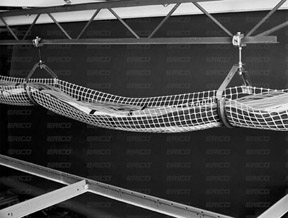
Another type of cable-suspension device is the CADDY CatTrax from ERICO. These cable trays are flexible and easy to install, and they can be installed in the ceiling space, telecommunications room, or equipment room. The CatTrax (shown in Figure 2) also keeps cables from being laid directly onto the ceiling tile of a false ceiling or across lights and electrical conduit because it provides continuous support for cables.

 
Figure 2: The CADDY CatTrax flexible cable tray from ERICO
Tip 
Numerous alternatives to cable-tray supports are available. One of the most common is a J hook. J hooks are metal supports in the shape of an L or J that attach to beams, columns, walls, or the structural ceiling. Cables are simply draped from hook to hook. Spacing of hooks should be from 4 to 5 maximum, and the intervals should vary slightly to avoid the creation of harmonic intervals that may affect transmission performance.

Raceways

Raceways are special types of conduits used for surface-mounting horizontal cables. Raceways are usually pieced together in a modular fashion with vendors providing connectors that do not exceed the minimum bend radius. Raceways are mounted on the outside of a wall in places where cable is not easily installed inside the wall; they are commonly used on walls made of brick or concrete where no telecommunications conduit has been installed. To provide for accessibility and modularity, raceways are manufactured in components (see Figure 3).

 
Figure 3: A surface-mounted modular raceway system
Figure 4 shows a sample of a surface-mount raceway carrying a couple of different cables; this raceway is hinged to allow cables to be easily installed.

 
Figure 4: A sample surface-mount raceway with cables
One-piece systems usually provide a flexible joint for opening the raceway to access cables; after opening, the raceway can be snapped shut. To meet information-output needs, raceway vendors often produce modular connectors to integrate with their raceway systems.

Fiber-Protection Systems

As with raceways, fiber-protection systems (see Figure 5) are special types of conduits and cable-management systems designed specifically to address the special protection needs of optical fiber cable. Although maintaining proper bend radius is important for all cable media, severe bends in optical fiber cable will result in attenuation and eventual signal loss, which translates to lost data, troubleshooting, downed network connections, and lost productivity. Severe bends can also lead to cracking and physical failure of the fiber. By employing rounded surfaces and corners, fiber-protection systems essentially limit the degree of bending put on an optical fiber cable. To protect your fiber investment, we recommend that you consider investing in a fiber-protection system.

 
Figure 5: The Siemon Company's LightWays fiber-protection system
KEY TERM: inner duct 
Inner duct is a flexible plastic conduit system often used inside a larger conduit; fiber-optic cable is run through it for an additional layer of protection.
When evaluating a prospective fiber-protection system, you should account for the total cost of the installation rather than just the cost of materials. Also ensure that it will support the weight of your cable without sagging. In addition, because your network will grow with time, you should consider how flexible the solution will be for future modifications. Will you be able to add new segments or vertical drops without having to move existing cable? The most expensive part of your system will be the labor costs associated with the installation. Does the system require special tools to install, or does it snap together in a modular fashion?